What a CRM for small businesses is and why your business in Málaga needs one
If you have a small business or you are a freelancer in Málaga, you probably manage your clients between a spreadsheet, your email inbox, several WhatsApp chats and, with luck, a paper diary. It works... until it stops working. I am Elmar Mamedova, a full stack developer in Málaga, and in this article I am going to explain to you clearly what a CRM is, what it is really for and how to decide whether your business needs one.
I am not going to sell you hot air or fill you with technicalities. My goal is that you finish reading knowing whether a CRM suits you, which functions are essential and how to avoid the typical mistakes that lead many companies to pay for an expensive tool that nobody uses. Let us get to it.
What a CRM is and what it is for
CRM stands for "Customer Relationship Management". In practice, a CRM is the single place where you keep all the information about your contacts, clients and sales opportunities: who each person is, what they have bought, when you last spoke to them and what you have pending to do. If you want the academic definition, it is well explained in the Wikipedia article on Customer Relationship Management.
What matters is not the definition, but the change in mindset. A CRM turns scattered information (emails, loose notes, messages) into an orderly system where nothing gets lost. You stop depending on the memory of one particular person and start depending on a process. That, for a small business, is worth gold: it means that even if your salesperson is off sick or leaves, the relationship with the client stays alive.
A good CRM serves you, at the very least, for three things: centralising your clients' data, following up on each sale before it goes cold and automating repetitive tasks such as reminders or follow-up emails. From there, each business gets more or less out of it depending on its sector and its way of working.
Signs that your small business already needs a CRM
Many clients ask me whether their business is "too small" for a CRM. My answer is usually the same: it is not a question of size, but of symptoms. If you recognise yourself in several of these points, you very likely already need one.
- Opportunities slip away because you forget to follow up on quotes you have sent.
- You have your clients' information spread across spreadsheets, email and WhatsApp.
- You do not know how many new clients you have got this month or where they come from.
- If a member of the team leaves, they take with them the knowledge of "their" clients.
- You waste time writing the same emails over and over.
- You have no idea which campaign or channel brings you the best clients.
Each of these points is money left along the way. A quote without follow-up is a lost sale; a poorly attended client goes to the competition. The CRM is not a technological whim: it is the way to plug those revenue leaks that almost never show up in the accounts but which you feel in the bottom line.
A quick rule
If you manage more than 30 or 40 active clients and you rely on memory or loose notes to follow up, you are already late with a CRM. Do not wait to lose an important sale to make up your mind.
Essential functions of a CRM
The market is full of tools with hundreds of functions you will never use. For a small business, the sensible thing is to focus on what really moves the needle. These are the functions I consider essential before looking at anything else.
- 1Unified client record: the entire history of a person on a single screen.
- 2Visual sales funnel: see at a glance which stage each opportunity is in.
- 3Reminders and tasks: so the system tells you who you need to call today.
- 4Automation of emails and follow-ups so you do not write the same thing a thousand times.
- 5Simple reports: sales for the month, conversion rate and origin of clients.
- 6Integration with your website, your diary and your payment tools.
Notice that none of these functions is exotic. They are the ones you will use every day. If a tool boasts about artificial intelligence but does not let you clearly see which stage each sale is in, it is selling you the wrapping, not the content. In my experience, a CRM well focused on these six things performs better than one bloated with functions nobody touches.
Payment counts too
Connecting your CRM with a payment gateway such as [Stripe](https://stripe.com) lets you charge for bookings or deposits within the same sales flow. Less friction for the client and fewer unpaid invoices for you.
Custom CRM versus generic CRM
Here is one of the most important decisions. Generic CRMs such as Salesforce or HubSpot are powerful and very well known, but they are designed to fit thousands of companies at once. That has a good side (you get started quickly) and a bad side: you end up adapting your business to the tool, paying for modules you do not use and fighting against an interface designed for others.
A custom CRM is exactly the opposite: the tool adapts to your way of working, not the other way around. If your clinic manages appointments with reminders, if your academy tracks enrolments and monthly payments or if your workshop follows quotes by status, a system made to your measure removes everything superfluous and reinforces what you really use every day. You have examples of this approach in my projects and on the personalised CRM page.
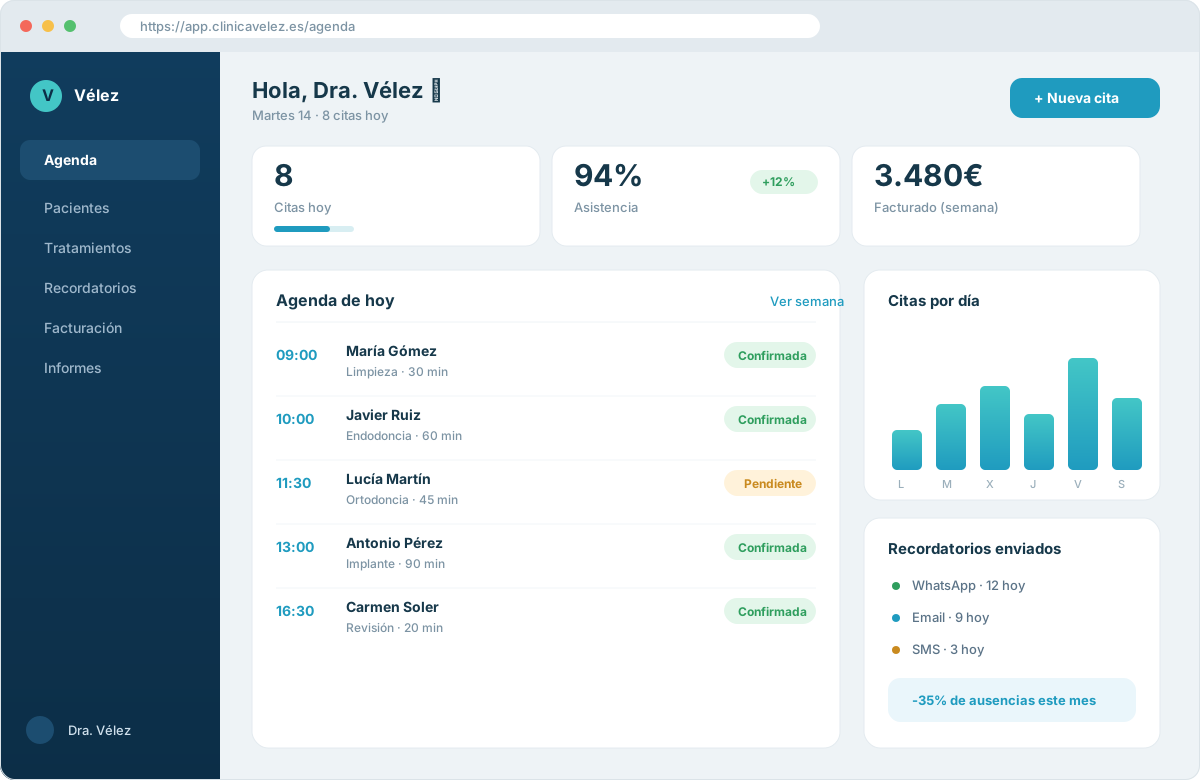
My honest recommendation: if you are a very standard company with no particular processes, a well-configured generic CRM may be enough for you. But if your business has its own way of working (and almost all small businesses do), a custom system usually turns out more profitable in the medium term, because you pay once for what you need instead of endless monthly fees for functions you ignore.
A CRM does not have to be complicated to be powerful. It has to fit your business like a glove: everything else is superfluous.
Want a CRM made to your measure?
I design and develop personalised CRMs for small businesses and freelancers in Málaga, with no unnecessary fees and with the functions you really use.
See personalised CRMHow to choose the right CRM for your business
Choosing a CRM is not about looking for "the best" in the abstract, but the best one for you. Before looking at prices or comparisons, it is worth being clear about your priorities. I usually guide my clients with these questions, because they bring order to the decision and prevent impulse purchases.
- How many people are going to use it and what technical level do they have?
- Which key processes do I want it to cover: sales, appointments, after-sales, everything?
- Which tools does it need to connect with (website, diary, invoicing, payments)?
- Do I prefer to pay monthly fees or a one-off custom investment?
- Who gives me support when something breaks or I want to change something?
Answering these five questions saves you months of trial and error. If the answer is that you need something flexible, connected to your website and to your appointment scheduling system, it is very likely that a custom or highly personalised development will give you a better result than a closed package. And if you are in doubt, start simple: it is easier to expand a simple CRM than to rescue a team overwhelmed by a huge one.
Common mistakes when implementing a CRM
I have seen many implementations fail, and almost always for the same reasons. The good news is that they are all avoidable if you know about them in advance. These are the ones most repeated in small businesses.
- 1Choosing the most complete tool instead of the most usable one: if your team does not understand it, they will not use it.
- 2Not migrating the old data properly and starting with the information half done.
- 3Not defining a clear sales process before configuring the CRM.
- 4Implementing it without training the team and without someone responsible to lead it.
- 5Buying many licences "just in case" and overpaying from day one.
The underlying mistake is almost always the same: treating the CRM as a product you buy and that is that, when in reality it is a change in the way of working. The technology is the easy part; the difficult thing is adoption. That is why I prefer to start with something small that the team really uses, and grow from there. A CRM at 100% usage and 60% of functions always beats one at 100% of functions and 10% usage.
Start with a pilot
Before rolling out the CRM across the whole company, try it with a small process or team for a few weeks. You will learn what really works and you will reach the final implementation with much less risk.
Integration with your website and automation
An isolated CRM is worthwhile, but a connected CRM multiplies its value. The idea is that every form on your website, every booking and every new client enter the system on their own, without anyone copying data by hand. When someone fills in the contact form, the CRM should create the record, assign the follow-up task and, if you want, send an automatic welcome email.
That is where having the website and the CRM made to understand each other really shows. You can connect your site with your management system, with your appointment scheduling system and with your campaigns so that everything works at once. If you want to go deeper, I recommend reading about how to automate your business tasks and this other article on automation and AI in Málaga, where I explain concrete cases of processes that run on their own.
And for SEO it matters too: a well-structured website that feeds your CRM and appears on Google brings you clients while you sleep. If you want to understand how the search engine interprets your site, the official Google Search documentation is a serious reference. You have more on this approach on my automation page.
Conclusion: the CRM as the engine of your business
A CRM is not a luxury for large companies: it is the tool that brings order to your relationship with clients, plugs sales leaks and frees up your time from repetitive tasks. For a small business or a freelancer in Málaga, the key is not to buy the most famous one, but to choose (or build) the one that fits your way of working and grows with you. Start simple, connect it to your website and your diary, train your team and let the system do the boring work while you focus on selling and looking after people well. If you want us to set it up together, let us talk whenever you like.
Organise your appointments and clients from today
Book a call and I will show you how a CRM with a diary and automatic reminders can bring order to your business in Málaga.
Book an appointmentFrequently asked questions
It is a system where you keep and manage all the information about your clients and sales in one place, so you do not lose opportunities or depend on anyone's memory.
Let's bring this to your business
If you want to apply what you've read, tell me your case and I'll help you make it happen.
Related articles
Automation and Artificial Intelligence for companies in Málaga: how to save time and grow in 2025
Discover how process automation and artificial intelligence are transforming companies in Málaga. Real use cases, tools, benefits and first steps.
Automating your business: 7 tasks your small business can stop doing by hand
I show you 7 concrete tasks you can automate in your small business in Malaga, with the real pain, the technical solution and the hours you save.
Online booking and appointment system: how it stops costing you customers in Málaga
I explain how much managing appointments by phone costs and how an online booking system works for you 24/7, cuts no-shows and brings order to your business.