Automating your business: 7 tasks your small business can stop doing by hand
I'm Elmar Mamedova, a full stack developer in Malaga, and the phrase I hear most in a first meeting is always the same: "I don't have time for anything". It is not a feeling, it is maths. When I add up the hours a small team spends every week copying data from a form into a spreadsheet, chasing invoices or reminding people about appointments by phone, whole afternoons end up thrown in the bin. And the worst part is that this work adds nothing: nobody buys more because of it, it only stops something from breaking.
Automating your business does not mean building a robotized factory or spending a fortune. It means identifying those repetitive, boring, error-prone tasks and letting a system do them for you while you attend to clients. In this article I show you 7 very concrete tasks a small business can automate today. For each one I tell you the real pain it causes, the solution I usually implement and the saving you get. No hot air and with examples of projects I have done here, in Malaga.
What automating your business really means
Automating is connecting the tools you already use so that they talk to each other without you having to act as the messenger. Your web form, your email, your calendar, your invoicing program and your customer database can all work together. When a piece of data comes in on one side, it travels on its own to where it needs to be, triggers an email or creates a task, and stays on record. You stop typing the same thing three times.
The piece that usually holds all of this together is a good central system where your clients and your processes live. If you are not yet clear on what that is, I recommend reading what a CRM is, because almost all the automations in this article rely on one. And if you want to go deeper into the theory, customer relationship management has decades of history behind it.
The rule of three times
If you do the same manual task three times a week, it is already worth automating. The cost of setting it up once is almost always recovered in the first month of hours saved.
1. Capturing leads from forms
The pain: someone fills in the contact form on your website, an email arrives in an overloaded inbox and stays buried there for two days. By the time you reply, the client has already asked three others for a quote. In lead capture, speed is almost everything, and manual copy-paste kills it.
The solution: I connect the form directly to your customer database so that each new contact is created on its own, tagged by source and service. An welcome email is sent instantly and a follow-up task is created, assigned to the right person. If you want to see how I integrate this kind of custom workflow, I explain it in my automation services and in some real cases in my projects.
The saving: you go from replying in hours to replying in seconds, and you stop losing leads through forgetfulness. In a consultancy I worked with, this alone raised the on-time response rate from 60% to 98% without hiring anyone else.
2. Automatic appointment reminders
The pain: no-shows. A client who does not turn up to their appointment is a gap that no longer gets filled and money that does not come in. Reminding people manually by phone for every appointment eats up hours of your team, and even so many still slip through.
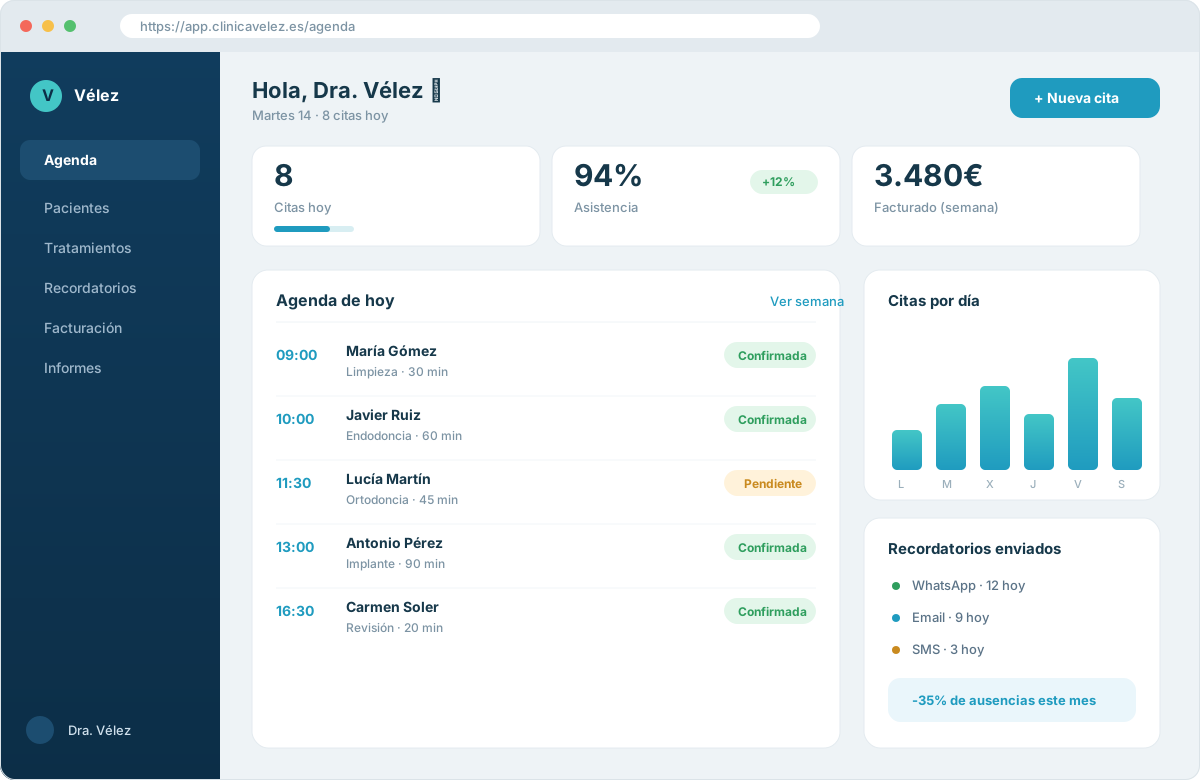
The solution: schedule automatic reminders by email or SMS that go out 24 hours before each appointment, with the option to confirm or reschedule in one click. The system reads your calendar and takes care of the rest. It is exactly what I set up when I integrate an online booking and appointments system with a synchronized calendar.
The saving: fewer empty slots and fewer phone calls. In a clinic in Velez-Malaga, automatic reminders reduced no-shows by 35% in the first quarter. That percentage is revenue that used to simply disappear.
3. Generating and sending invoices
The pain: at the end of the month the invoice party arrives. Copying amounts, tax details and line items one by one, sending each PDF and then chasing payments. It is one of the most hated tasks and, on top of that, where the most number errors creep in.
The solution: generate the invoice automatically as soon as a service or payment is confirmed, with the client details already loaded from the CRM. If you charge online, integrating gateways such as Stripe allows the invoice and the payment to go hand in hand, and even to send automatic payment reminders to anyone running late.
- Sequential numbering with no gaps or duplicates.
- Client tax details always up to date.
- Automatic sending of the PDF when the service is confirmed.
- Non-payment notices scheduled without you having to remember them.
The saving: what used to be a whole afternoon of monthly closing turns into a ten-minute review. And invoicing errors, which cost time and credibility, practically disappear.
Is your team losing hours on repetitive tasks?
I analyze your processes and tell you exactly what you can automate and how much time you get back each week.
See automation services4. Follow-up emails that send themselves
The pain: follow-up is where sales are closed, but it is also the first thing to be dropped when things get hectic. "I'll write to them tomorrow" turns into never, and a quote you sent cools down until it dies.
The solution: automatic email sequences based on each client's stage. You sent a quote, three days pass with no reply and a friendly reminder goes out. You closed a sale, a welcome series starts. Everything set up once and triggered by the client's behavior, not by your memory.
The difference between a small business that grows and one that stalls is usually not the product, but whether it follows up on every opportunity or lets it die in the inbox.
The saving: you stop losing sales through lack of consistency. A follow-up that used to depend on someone remembering is now systematic, and that shows up directly in revenue.
5. Answers to frequently asked questions
The pain: your team answers the same ten questions every day. Opening hours, prices, location, how to book. Each answer is a minute, but multiplied by dozens of messages a day it eats up a whole working day of customer service.
The solution: an automatic assistant on the website or on WhatsApp that instantly resolves the usual doubts and only hands over to a person when it is truly needed. Well configured on your real information, it attends outside working hours and filters the noise so your team can focus on what matters.
- 1I gather the questions you repeat most and their official answers.
- 2I configure the assistant to respond with your tone and your data.
- 3I define when it should pass the conversation to a real person.
- 4I review and fine-tune the answers based on how the first weeks go.
The saving: your team gets back hours of customer service and clients get an immediate response at any time. Service improves and cost goes down at the same time.
6. Automatic reports and dashboards
The pain: to know how the business is doing you have to open five tools, export data to a spreadsheet, cross-reference it and build a chart. By the time the report is ready, the data is already old and nobody feels like doing it again the following month.
The solution: a dashboard that updates on its own with your sales, appointments, leads and payments in real time. You go in, look and decide. The data travels automatically from each tool to a single panel, with no exports or copy-paste.
The saving: you make decisions with fresh data instead of with intuition and outdated spreadsheets. And you get back the monthly hours that used to go into preparing reports nobody looked at again.
Automate to decide, not just to save
The greatest value of an automatic dashboard is not the time you save building it, but the bad decisions you avoid by seeing the reality of your business every day instead of every quarter.
7. Automatic backups
The pain: the backup is that thing everyone knows they should do and almost nobody does. Until one day a disk breaks, a virus sneaks in or someone deletes a folder by mistake, and months of work are lost. The manual backup is always forgotten right before disaster strikes.
The solution: automatic, encrypted backups of your database and your key files, scheduled daily or hourly depending on how critical they are, and stored in a separate location. Once configured, they run on their own and alert you if something fails. This is part of how I build any custom CRM so that your data is always protected.
The saving: the real saving here is not measured in hours, but in the disaster you avoid. A good backup strategy is the difference between a five-minute scare and closing the business for a week.
Where to start without burning out
Do not try to automate everything at once. The most common mistake is wanting to build the perfect system in one go, getting overwhelmed and finishing nothing. Start with the task that hurts you most: usually lead capture or appointment reminders, because their return shows up in days. When that one works and you feel the relief, you move on to the next.
It also helps for your website to be well built so that the automations rely on clean data and so that Google understands it. If you want to get into the technical detail, Google's documentation for search engines is the official reference. A solid foundation makes everything else fit together without patches.
And a piece of advice from someone who has seen many projects: document every automation you build. So that anyone on the team understands what it does and why. An automation that only you understand is a time bomb the day you go on holiday.
Let us talk about your business
Book a call with no commitment and together we will see which tasks you can stop doing by hand from this very month.
Book a callConclusion: your time is worth more than a spreadsheet
The 7 tasks we have seen (lead capture, appointment reminders, invoices, follow-up emails, frequent answers, reports and backups) have something in common: they are repetitive, they add no value in themselves and they consume the time you should be spending on growing your business. Each one you automate is one less worry and a few more hours for what really matters.
You do not need to do it all at once or spend a fortune. You need to start with one, measure the saving and build from there. This is exactly what I do in Malaga: look at a small business's processes and give back the time that manual work steals from it. If you recognized yourself at any point in this article, you probably already know where to start.
Frequently asked questions
It depends on how many tasks and how complex they are, but you do not need a big budget to get started. The usual approach is to begin with one or two high-impact automations, such as lead capture or appointment reminders, whose cost is recovered in the first month of hours saved. From there you expand according to results.
Let's bring this to your business
If you want to apply what you've read, tell me your case and I'll help you make it happen.
Related articles
Automation and Artificial Intelligence for companies in Málaga: how to save time and grow in 2025
Discover how process automation and artificial intelligence are transforming companies in Málaga. Real use cases, tools, benefits and first steps.
What a CRM for small businesses is and why your business in Málaga needs one
I explain what a CRM is, what it is for and how to choose the right one for your small business in Málaga, with real examples and mistakes worth avoiding.
Online booking and appointment system: how it stops costing you customers in Málaga
I explain how much managing appointments by phone costs and how an online booking system works for you 24/7, cuts no-shows and brings order to your business.